

A virtual approach to gynecology
UCSF School of Medicine
My role
UX research
UI design
Information architecture
Results
Program has been implemented into UCSF's curriculum as a training tool for advance practice nursing students.

Virtual reality: A powerful tool for learning retention
When it comes to vocational training, VR has been shown to be a more effective learning system than traditional training courses alone, resulting in faster skill acquisition and enhanced learning retention. To evaluate the usefulness of VR in a medical context, UCSF School of Medicine enlisted our team at KairosXR to build them a custom program.
This program focuses on the tools and procedures involved in a routine gynecological exam, with the aim of allowing students to familiarize themselves with the practice before moving to real patients. The program was built for VR and desktop, and includes sections featuring 360-degree instructional videos, interactive 3D modules, and a final learning assessment.
We began with user interviews to get a feel for students' wants and needs
We interviewed six nursing students at UCSF to get a better understanding of the challenges students face in nursing school, as well as what they believed would be the most helpful features to include in our program.

Combining the stakeholder requirements of the department with the user needs of the students, our team created a storyboard and I designed a flow diagram as a reference.

Maintaining a consistent design across the platform proved to be a challenge
The user flow shows that the program requires jumping between 2D screens, 360-degree videos, and interactive 3D segments. Seamlessly switching between these modalities while maintaining a consistent interface proved to be tricky, and several design questions arose as a result:
How can interactive tools be integrated into a non-interactive 360 video?
How can a user look around freely in 3D while also clicking and interacting with objects in the desktop version?
Is it possible for one interface to be used across all formats?

After several attempts, it became clear that a single interface across the various formats was not a feasible option, as the sections required different features and menus specific to their content.
As a solution, I focused on keeping just one UI element containing the core functionalities consistent across all of the program’s modules. This would provide the user with a familiar usability tool while still maintaining the flexibility necessary to function well in both 360 and 3D. Thus, the toolbar:
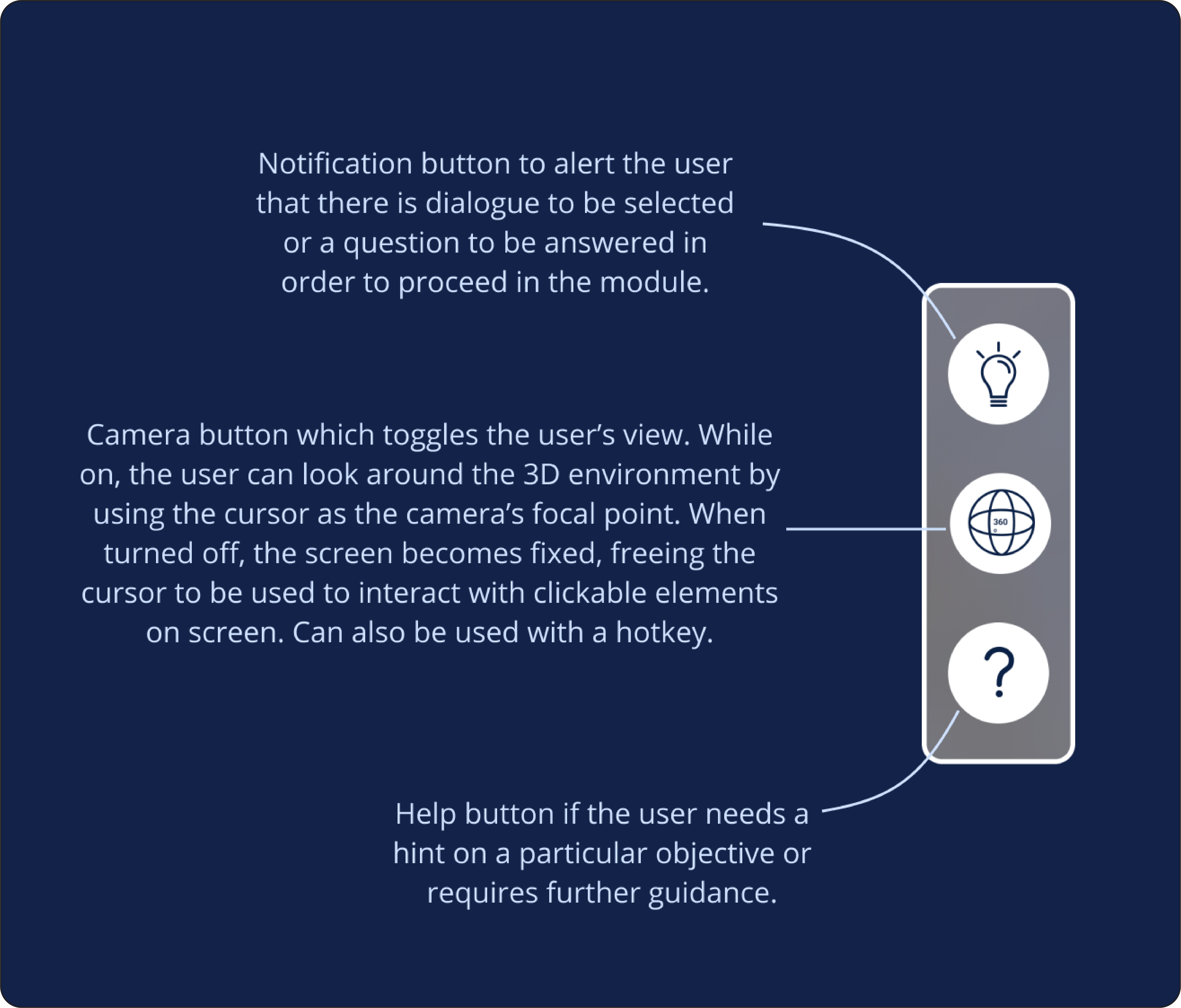
In addition to working in 360 and 3D, the toolbar also solved the issue of switching between looking around and clicking in 3D modules by including the camera toggle button.
Home Menu
The program focuses on a 360 video segment, an interactive exam practice, and an immersive final challenge to test users on their knowledge. I designed badges to signify completion of each segment, as well as the ability to go back to review previously incorrect answers.


360 Exam Training
The first module features a non-interactive 360 video offering step-by-step guidance from a medical professional. Questions appear intermittently from the toolbar throughout the video, as well as additional information about the gynecological exam process.


3D Kit Practice
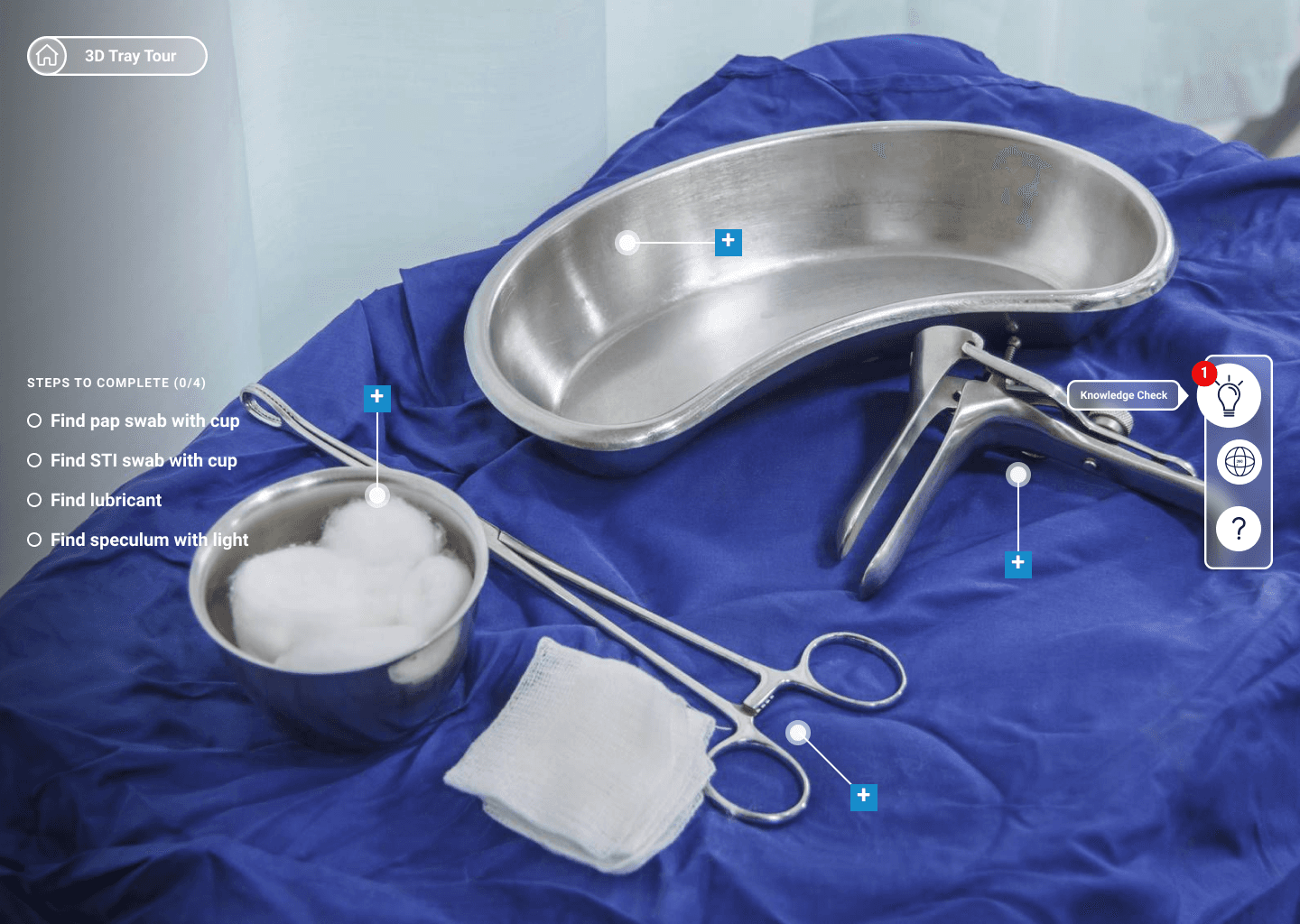
In the second module, the user is able to look around a 3D operating tray and interact with medical tools involved in examinations. The left side of the screen becomes a checklist for locating each instrument, while the toolbar provides instructions as well as questions from the previous module.

Final Challenge
The last module uses a combination of 360 video and 3D interactions to test the user for mastery of the previous lessons.

Testing and Feedback
After our team built a functional initial prototype on desktop, we conducted usability tests with five students. We also included an exit survey for additional feedback.


We took these points of feedback into account when building the VR version as well as refining the desktop version. The final iterations included a completion log that allows users to go back to missed answers, an in-sim spoken guide for more comprehensive instructions, and the ability to create an account in order for users to switch between desktop and VR while saving their progress.
Virtual Reality
In order to make the program run smoothly in VR, I designed an interactive tablet that would house all of the UI assets. I adjusted the buttons, menus, and other information from the desktop version to be usable within the tablet while the user progressed through the 3D module.


I placed the toolbar on the bottom of the tablet, while changing the 'View' toggle to a checklist button, since VR does not require switching between looking around and clicking.
With the designs finalized for both versions of the application, the files were sent to the development team and my contribution to the project was completed.
© 2026